


Meetup: Social Events & Groups
3.819.86K Reviews
App Specs
- Version
- 2026.10.01.3069
- Updated On
- License
- Free
- Downloads
- 10,000,000+
- Developer
- Meetup
- Categories
- Social
- Platform
- Android, iOS
Screenshots




 Analysis by AppCompare
I judge social apps less by how many groups they can show me and more by what happens when I decide to meet strangers offline. That is the real promise—and the real responsibility—of Meetup: Social Events & Groups. It is a social app from Meetup, built around local groups and gatherings rather than a stream of updates from people I already know. I find that distinction useful: it gives me a practical reason to open the app, but it also means I should think carefully about what I share and which events I choose.
Trust starts with the event, not the profile
Meetup has been around since April 14, 2011, and its current version is 2026.02.13.2820. It is free to install, rated Teen, and has a 4.0 average from around 232,000 ratings, with more than 10 million installs. Those figures suggest a well-established service, but popularity alone cannot tell me whether a particular group or gathering is a good fit. I treat each event as its own decision: I read the details, consider the setting, and decide whether I am comfortable attending.
That mindset matters because the app connects online discovery with in-person plans. A friendly group description can help me decide whether an activity sounds welcoming, but it is not a guarantee of the atmosphere on the day. I would use the event information to prepare, not as a substitute for ordinary judgment. If I am unsure, I can choose a public, structured activity and make my first visit a short commitment rather than planning my whole day around it.
What I can control before joining in
The useful choice is not simply whether to join a group. It is how much I participate and when. I can look around before committing, compare events, and decide whether I want to attend or take a more active role. That gradual approach is especially helpful if I am new to a city or returning to a hobby after a long break: I do not have to turn curiosity into an immediate social obligation.
Group discussions and messaging can make an event feel less like walking into a room cold. I would keep early conversations focused on the activity and practical arrangements, sharing personal details only when there is a good reason. The same goes for a profile: enough information to make my interests legible can help people understand why I am there, while a more restrained profile leaves me with more privacy. I see that balance as a personal choice, not a box to tick once and forget.
Think through the moments when details matter
Planning a meetup often involves exchanging information such as where to gather and how to recognize the group. Those details are useful, but they can also reveal routines or where I will be at a particular time. I would keep coordination within the context of the event when possible, avoid posting details that are not needed, and be thoughtful about photos that identify other attendees. A quick check before sharing is easier than trying to undo an overshare afterward.
Before going, I would also make a simple plan that does not depend on a stranger: know the venue, arrange my own way there and back, and let someone I trust know where I am going if that feels appropriate. These are ordinary precautions, not a reason to avoid the app. They are especially sensible for a first meeting, an unfamiliar neighborhood, or any event where I do not yet know the organizer.
Worth Reading Before You Choose

Flipboard Shows What News Apps Must Do Beyond the Feed

Switching to Android Auto Means Rethinking Your Driving Routine

Google Calendar Makes a Crowded Week Easier to Manage

Ludo King Makes the Most of the Minutes Between Plans

Baby Panda World Brings Quick Play to Modern Phones, but Its Game Library Feels Busy

ESPN’s Live Game View Makes Following Close Games Easier
Agency means choosing the right level of involvement
Meetup works best for me when I treat it as a tool for finding a real-world activity, not as a promise that every group will suit me. I can start by browsing, then attend one event, and only afterward decide whether a group deserves a longer commitment. If the tone feels wrong, I can leave without needing to turn a mismatch into a debate. I also appreciate thinking of event attendance as optional: notifications can help me keep track, but I do not have to say yes just because an invitation appears.
There is a meaningful distinction between finding a community and building one. Joining an established group is usually the lower-effort route; creating and maintaining a group asks more of me, including setting a clear purpose and helping people understand what to expect. I would start a group only if I had the time to follow through, rather than assuming that creating a page alone will produce a dependable community.
Discovering New Experiences
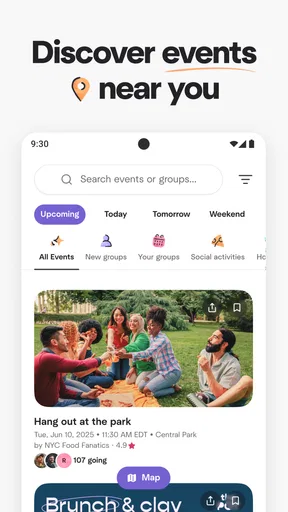
After downloading the app, I was immediately drawn in by its sleek and user-friendly interface. Setting up a profile was a breeze, and within minutes, I was exploring a plethora of events and groups tailored to my interests. From hiking groups to tech meetups, there was something for everyone.
The search functionality is quite robust. You can filter events by date, distance, or category, making it super easy to find exactly what you’re in the mood for. I decided to attend a photography meetup, and the app provided all the details I needed, including location, time, and even a brief on what to expect.
Joining and Creating Groups
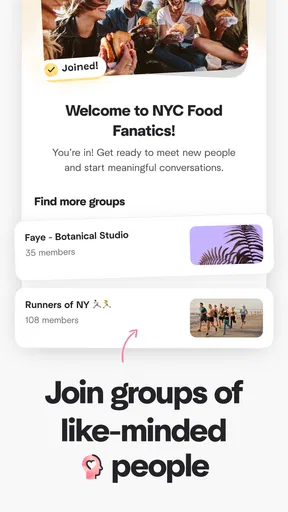
One of the standout features of Meetup: Social Events & Groups is the ability to join existing groups or create your own. It’s perfect for those who have niche interests or want to gather like-minded individuals for a cause or hobby. I joined a local book club, and it was as simple as clicking a button. The group page offered a forum-like environment where members could post discussions, share photos, and organize future meetups.
Creating a group is just as straightforward. I tested it out by setting up a weekend running club. The app guides you through the process, from selecting a category to promoting your group. You even have the option to set membership criteria, ensuring your group attracts the right crowd.
Engaging with the Community
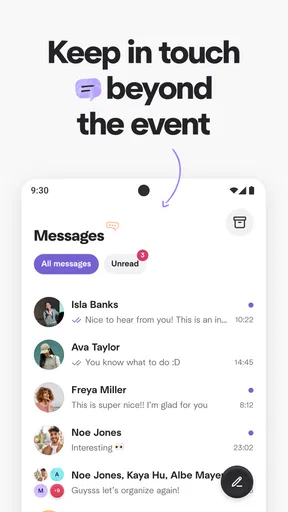
The community aspect of the app is where it truly shines. It’s more than just attending events; it’s about building connections. Before the photography meetup, I interacted with some members through the app’s messaging feature. It was a great way to break the ice and make the actual meetup feel less daunting.
The app also offers notifications for upcoming events, new messages, and group activities, keeping you in the loop and ensuring you never miss out on an opportunity to engage.
Safety and Accessibility
In today’s digital age, safety is paramount, and Meetup doesn’t disappoint. The app has implemented several safety features and guidelines to ensure a secure experience. You can report inappropriate behavior, and the app provides tips on meeting safely with new people.
Accessibility is another strong suit. It’s available on both Android and iOS, and the developers have done a commendable job making the interface intuitive. Even if you’re not tech-savvy, navigating through the app feels natural.
Finding the right rhythm for real life
A practical way to use the search is to start with a time you can genuinely keep, then narrow by distance and activity. I would not begin by joining every promising group in a broad interest area; that can leave me with too many updates and no clear plan. Instead, I would save my attention for one event that fits my schedule, read its description closely, and use the group conversation to clarify a practical point if needed. That turns browsing into a manageable next step.
For example, imagine I have moved to a new neighborhood and want to get outside on Saturday without making the day revolve around meeting people. I could look for a nearby walking or photography gathering, check the start time and meeting place, and message the group about what to bring. I can arrive, take part in the activity, and leave when it ends. The activity gives conversation a natural focus, which can feel easier than trying to start from scratch at a busy social venue.
This is where Meetup differs from the usual alternatives. A general social network is often strongest for keeping up with existing contacts, while a local chat group may be useful for quick neighborhood notices but less structured around shared activities. Meetup’s particular value is the bridge from an interest-based group to an event with a time and place. If my goal is only to browse posts or maintain close friendships, my existing social channels are probably simpler. If I want a scheduled activity with people who chose the same subject, this format makes more sense.
Small decisions that make participation easier
I would treat the event description as a planning tool, not just an advertisement. Look for details that answer the questions you would otherwise have to ask at the door: what the activity involves, whether it is suitable for a beginner, and what the group expects from attendees. If those points are unclear, a short message beforehand can prevent an awkward mismatch. For a first event, choosing something with a defined activity is often easier than attending an open-ended social gathering because there is an immediate shared subject.
Notifications are useful when I am actively following a group, but they can also turn a casual interest into background noise. I would be selective about which groups I keep up with and review whether their updates still help me make plans. That is a small but important trade-off: fewer alerts mean less interruption, while too little attention can make it easier to miss a change to an event I intend to attend. I would keep reminders useful rather than letting every group compete for my attention.
There is also a difference between joining a group and attending its events. Joining can help me follow discussions and see what is planned, but it does not mean I have to become a regular or share more than I want. Conversely, if I am organizing, clear expectations matter more than a polished group page. A concise description of the activity, who it is for, and what an attendee should bring gives people a better basis for deciding whether to come.
Who will get the most from it
I would recommend Meetup to someone who wants an activity to make meeting people feel less forced: a newcomer looking for local interests, a hobbyist hoping to find a recurring group, or a person who prefers a planned outing over unstructured mingling. It can also suit someone with a niche interest that is hard to pursue alone, provided there are relevant groups nearby. The key benefit is not that every gathering will turn into a friendship; it is that a shared activity gives people a reason to meet again if the first encounter goes well.
I would be more cautious about recommending it to someone who wants guaranteed company, instant replies, or a fully curated social calendar. The value depends on whether the groups and events they find fit their location, schedule, and expectations. Someone who dislikes meeting unfamiliar people in person may prefer online communities, while a person looking for one-to-one dating or private messaging as the main purpose should choose a service designed for that instead. Meetup is centered on groups and events, so it is at its best when that is what the user actually wants.
The app is free to download, but it includes in-app purchases ranging from $4.99 to $344.99 per item. I would not treat a paid option as a prerequisite for deciding whether the basic idea suits me: first I would see whether I can find worthwhile groups and events for my routine. If I am considering a purchase, I would check what it offers and whether that solves a real need for me rather than paying simply because I hope it will create a better local scene.
Wrapping It Up
So, is Meetup: Social Events & Groups worth a download? In my experience, absolutely. It’s a fantastic tool for anyone looking to expand their social circles, explore new interests, or simply get out of their comfort zone. Whether you’re an introvert looking to mingle or an extrovert seeking new adventures, this app offers something for everyone.
Next time you find yourself wanting to try something new or meet new people, give Meetup a shot. Who knows? You might just find your next favorite hobby or lifelong friends. Download it, explore, and let the adventures begin!
A grounded way to decide
My recommendation comes with one condition: judge it by the quality of the specific groups you can realistically attend, not by how appealing the idea of a larger social circle sounds. Start with one event, protect your personal boundaries, and give yourself permission to leave a group that does not feel like a fit. That approach makes the app more useful and keeps the decision in your hands.
For Android users, the listed minimum operating system is version 7.0; the app is also available on iOS. Meetup is a focused choice for turning a shared interest into a plan with other people. Its strongest use case is clear, but so is the trade-off: you still have to assess each gathering and decide how much time and personal information you want to contribute. If that balance feels right, I think it is worth trying.
Pros
- Easy to find local events and groups.
- User-friendly interface for all ages.
- Diverse categories for varied interests.
- Notifications for upcoming events.
- Option to create and manage own events.
Cons
- Limited features without a premium subscription.
- Occasional bugs in event notifications.
- Some groups may have inactive members.
- Requires constant internet connection.
- Privacy concerns with location access.
FAQs for Meetup: Social Events & Groups
What is Meetup and how does it work?
Meetup is a platform designed to help people connect with others who share similar interests or hobbies. Users can join groups or attend events based on their preferences. The app uses location services to suggest nearby events and groups, making it easy to find activities and social gatherings in your area.
Is Meetup free to use, or are there any hidden costs?
While creating a Meetup account and browsing events is free, some events may require a fee set by the organizer. Additionally, there is a subscription available for organizers who wish to create and manage their own groups, offering additional features for a monthly or annual fee.
How safe is it to attend events through Meetup?
Meetup prioritizes safety by allowing users to report inappropriate behavior and providing guidelines for event organizers. However, as with any social platform, users should exercise caution, meet in public places, and inform someone about their plans when attending events with new people.
Can I create my own group or event on Meetup?
Yes, users can create their own groups and events on Meetup. To do so, you need to subscribe to the organizer package, which includes tools for managing members, scheduling events, and promoting them to a broader audience. This feature is ideal for those looking to build a community around a specific interest.
What types of groups or events can I find on Meetup?
Meetup hosts a wide variety of groups and events, ranging from professional networking and tech meetups to hiking clubs and book discussions. Whether you're looking to expand your professional network, explore new hobbies, or make new friends, there's likely a group or event that fits your interests.


